OdysseyBMX.com V2.0
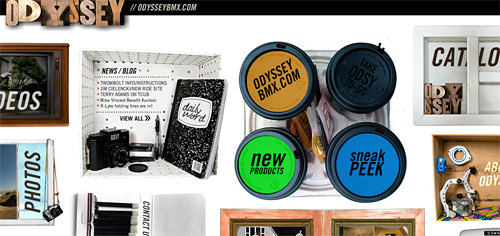
In case you didn’t notice, we have a new website. It’s a bit different than most but after a visit or two, you’ll find that it is still fairly easy to navigate. There are subtle features here and there (which may get over-looked) so here’s a quick breakdown of things.
 » NAVIGATION: To scroll the page, move your mouse in the direction you want to scroll to. The closer you are to the edge of the frame, the faster it’ll go. To view an item, you click on the thumbnail and it’ll zoom in. To get out, click the exit button (top right corner).
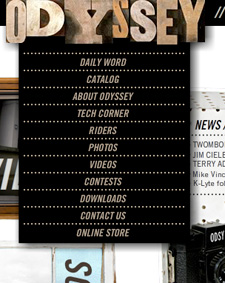
» DROP-DOWN MENU: If you move your mouse over the Odyssey type-set (top left corner of the main website), you’ll get a traditional drop down menu. You can click on any of those items at any given time and you’ll get taken directly to it. Also, clicking on the actual type-set will take you to the home page.
» DIRECT LINKING: Direct links to each individual section can be found in the side bar of the Daily Word (listed under OdysseyBMX.com).
» PHOTOS SECTION: If you see a photo that you like and wish to save, click the Download Link (underneath the photo) and a larger version of it will pop open in a new window.
» VIDEOS SECTION: Clicking the LINK button will copy the URL of the video onto your system’s clipboard. The HTML button will copy the HTML embed code needed to embed the TV onto other websites, blogs, profiles or whatever. These buttons eliminate the need of highlighting text and then clicking copy. When you click it, it automatically copies what you need for you. From there, all you have to do is paste. Clicking the MP4, HD and M4V buttons will provide you with a direct link to those versions of the video that’s playing (if it’s available). If you grab the HTML embed code from the Downloads section, the TV will play whatever the latest edit may be (as oppose to playing a specific video).
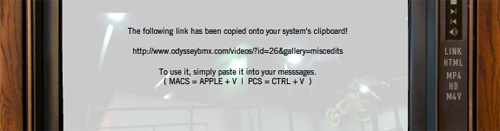
After clicking the LINK button, the message above gets shown. This will automatically fade out on its own but if you want it to go away even faster, just click on it.
» ODSY TO-GO: This box will keep you updated on the latest news at Odyssey. Clicking the top-left cup (ODYSSEYBMX.COM) will show you the latest posts on the Daily Word. You can navigate it using the arrows («») to get a glimpse of the last 25 posts. Mousing over the post title will show you the date it was posted, clicking it will take you directly to that post. Clicking “DAILY WORD” will take you to the Daily Word Home page. Clicking the “NEW PRODUCTS” and “SNEAK PEEK” cups will show you preview photos and clicking the photos will take you directly to the Daily Word post relating to it. You can browse these items using the arrows («») and the “X” button will close it out. Clicking on the top-right cup will copy the HTML embed code you need to embed the ODSY TO-GO box. After clicking it, all you have to do is paste.
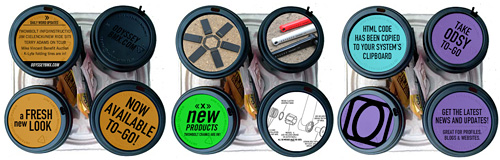
Top Left Cup / Bottom Left Cup (Sneak Peek looks similar) / Top Right Cup
» MOBILE PHONES / RSS FEED: If you’re accessing the website via mobile-phone that doesn’t have Flash, point your browser over to the Daily Word (https://www.odysseybmx.com/dailyword). Just about all of the updates will be shown through here. Our new RSS Feed can be found at https://www.odysseybmx.com/dailyword/feed/.
There are also a couple contests going on right now so make sure to head over to the Contest Section to check it out.